> For the complete documentation index, see [llms.txt](https://support.ninchat.com/ninchat-support/llms.txt). Markdown versions of documentation pages are available by appending `.md` to page URLs; this page is available as [Markdown](https://support.ninchat.com/ninchat-support/english-new/user-interface/general-tips/sign-in-problems.md).
# Problems with sign-in
Unable to log in?
### **Problems with signing in**
#### **Where can I access the service?**
> If your shortcut to Ninchat disappears or the address is forgotten, you can always access Ninchat by going to [**https://ninchat.com/new**](https://ninchat.com/new).
#### **Forgot your password?**
{% content-ref url="/pages/-LNjsNeQrZ1Ttn5EXSpx" %}
[Forgotten password](/ninchat-support/english-new/user-interface/general-tips/forgotten-password.md)
{% endcontent-ref %}
#### **Invalid email**
> If you get an error when signing in saying "Invalid email", the email address you are trying to use is either misspelled or there is no Ninchat account with that email. Check that you have written the sign-in email correctly.
>
> When you first created your Ninchat account, you received a verification email from us. You can check if you have that mail in your inbox to see the correct form of your sign-in email address.
>
> Sign-in error "Identity name is not a valid email address" means the given email address is not valid. Your Ninchat account is the email address you used to register in the service.
#### Change in sign-in email address
Your login email address may change, for example, after a name change. Do not create a new account; add the new email address to your existing account. [See the instructions for adding a new sign-in email](/ninchat-support/english-new/organization-member/user-account/user-settings.md#adding-a-new-login-email-address).
#### **Identity verification code is expired**
> If you see this error when you are trying to sign in, it means you are trying to use the account verification link twice. It can be used only once. After that, sign in normally by going to [**https://ninchat.com/new**](https://ninchat.com/new). Bookmark this address.
#### Invitation link not working?
> The invitation link does not work and you get an error message when trying to accept the invitation? The invitation link to the team channel is likely to be expired. Invitation links are valid only for 14 days. Ask for a new one from a colleague or Ninchat staff.
### **Problems after sign-in**
#### Something wrong with the user interface?
{% content-ref url="/pages/DjsYtlvAGQljuD1JuXPY" %}
[Interface problems](/ninchat-support/english-new/user-interface/general-tips/interface-problems.md)
{% endcontent-ref %}
### **Team channels not visible?**
Below you can find some situations when you cannot see the channels you want.
#### **Wrong organization selected**
If you do not see familiar channels and customer care queues in your Sidebar, you may have selected another organization or Public site.
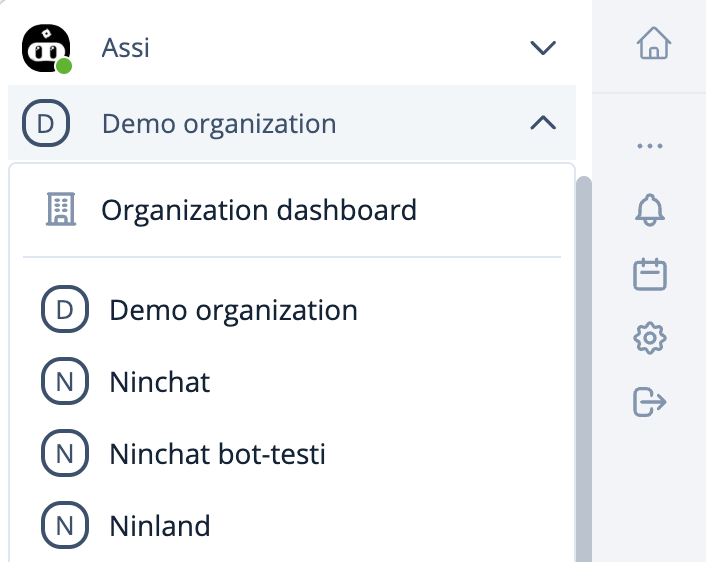
Go back to your desired organization by clicking the arrow icon next to the current organization name on the top of the Sidebar. Then select the organization you want from the drop-down menu.
View of the organization list in the dropdown menu.
#### **You signed up for the service without an invitation link**
Do you see the following screen instead of your team channel after signing in?

You have probably signed in to Ninchat without an invitation link and you are in a situation that you do not belong to any organization or team channel.
Find Ninchat invitation email in your inbox and click the invitation link (see instructions in the section "How to accept invitation?"), or ask a colleague or Ninchat staff for a new invitation link to the team channel.