> For the complete documentation index, see [llms.txt](https://support.ninchat.com/ninchat-support/llms.txt). Markdown versions of documentation pages are available by appending `.md` to page URLs; this page is available as [Markdown](https://support.ninchat.com/ninchat-support/english-new/user-interface/customer-service-queues-and-conversations.md).

# Customer service queues and audiences

Queues and customer conversation tools

Customer audiences are private 1-on-1 conversations between an agent and a customer. Agent picks customer from a queue, and audience is held using text, attachments, emojis, and if needed, via video call.

Customer audiences may include answers from pre-audience questionnaire and metadata about the customer.

Agents can utilize canned messages and they can and tags and notes to the conversation.

### **Queue bar and Queue event log**

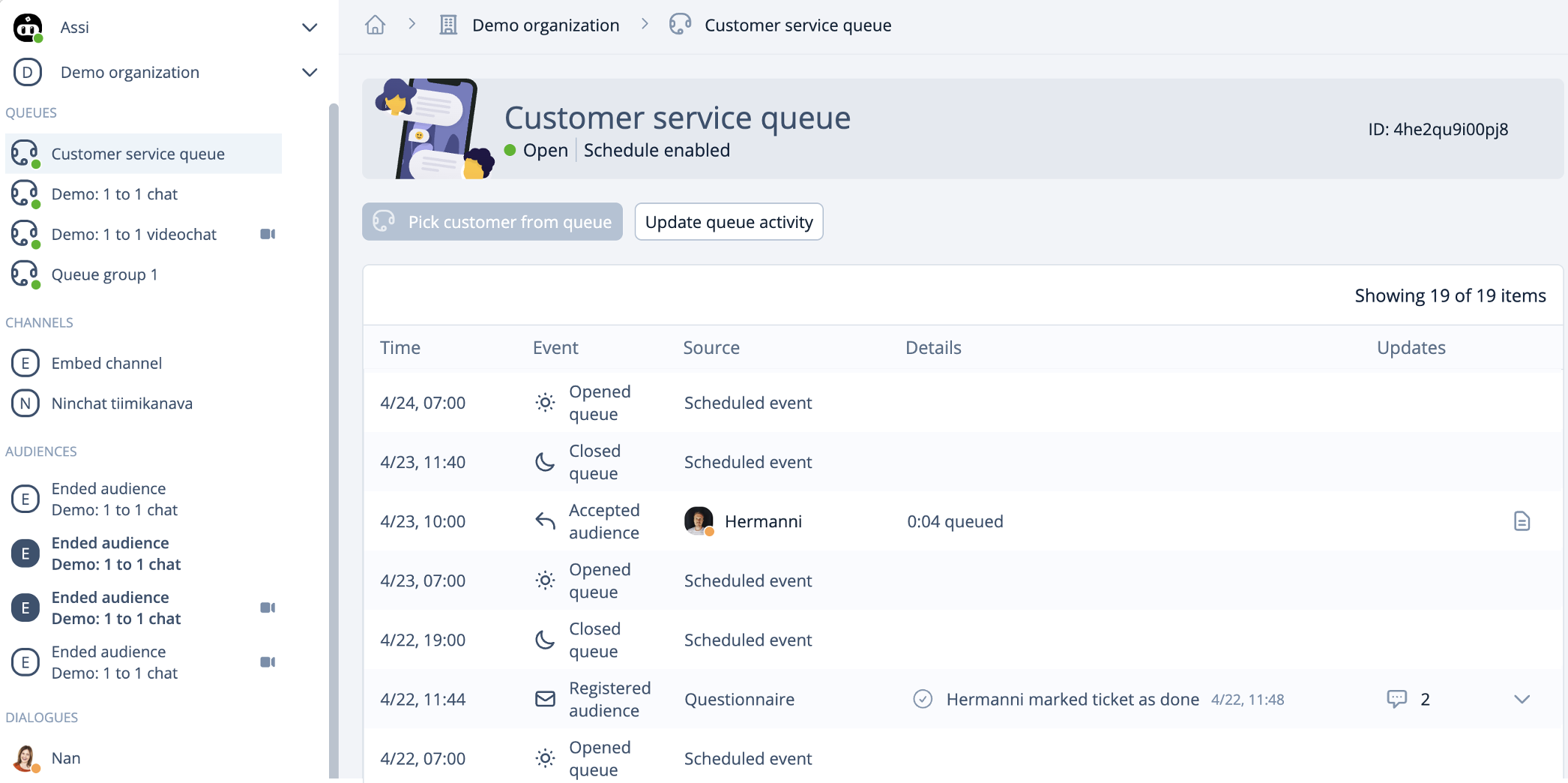
Customer care queues appear in the left Sidebar. Clicking a queue bar will open the queue activity view, which can be used to pick incoming customers from the queue and view activity log. The queue activity log shows different events of the queue i.e. when the queue was opened and closed, who picked customers (accepted audience) questionnaires and their status.

<div data-with-frame="true"><figure><img src="https://498815019-files.gitbook.io/~/files/v0/b/gitbook-x-prod.appspot.com/o/spaces%2FIeqTSbNtGOeWTiig2G5l%2Fuploads%2Fgit-blob-804045e269b5a7e744dea4f26e618eb7b940c9aa%2Fimage.png?alt=media" alt=""><figcaption><p>Queue activity view.</p></figcaption></figure></div>

{% content-ref url="/pages/-M7bSzjoSyA83cGLkNYA" %}
[Picking customers from queue](/ninchat-support/english-new/user-interface/customer-service-queues-and-conversations/picking-customer-from-queue.md)
{% endcontent-ref %}

### Customer queue states <a href="#asiakasjonon-tilat" id="asiakasjonon-tilat"></a>

Customer queue is shown in Sidebar with

* Red dot - Queue is closed
* Green dot - Queue is open
* Blue notice colours - There are customers in queue

In the sidebar, next to the queue name, you can see a clock that indicates how long the (first) customer in the queue has been waiting.

<div data-with-frame="true"><figure><img src="https://498815019-files.gitbook.io/~/files/v0/b/gitbook-x-prod.appspot.com/o/spaces%2FIeqTSbNtGOeWTiig2G5l%2Fuploads%2Fgit-blob-be1cddead31868ea1786a69930979e7544eaf863%2Fimage.png?alt=media" alt=""><figcaption><p>The customer queue in the sidebar: Closed (red), open (green), customer in queue (blue).</p></figcaption></figure></div>

### **Queue menu functions** <a href="#queue-menu-functions" id="queue-menu-functions"></a>

Clicking the arrow icon next to a queue name in the Sidebar will open a drop-down menu that allows you to pick customers without having to go to the queue view. You can also use the drop-down menu to manually close the queue.

#### Queue Menu Actions

* Open Event Log (click the queue name)
* Pick a customer from the queue
* Open/Close the queue
* Access queue settings (requires organization operator rights)
* Access queue statistics (requires organization operator rights)

<div data-with-frame="true"><figure><img src="https://498815019-files.gitbook.io/~/files/v0/b/gitbook-x-prod.appspot.com/o/spaces%2FIeqTSbNtGOeWTiig2G5l%2Fuploads%2Fgit-blob-8d4204e9666498f1609976cf8d3dd0de14caad52%2Fimage.png?alt=media" alt=""><figcaption><p>The queue dropdown menu.</p></figcaption></figure></div>

### **Opening and closing queue**

{% content-ref url="/pages/-M7bTYBMRvAh6pugw4CZ" %}
[Opening and closing queue](/ninchat-support/english-new/user-interface/customer-service-queues-and-conversations/opening-and-closing-queue.md)
{% endcontent-ref %}

{% content-ref url="/pages/-Li7xMP\_5UU5Qw6q74LH" %}
[Queue schedule](/ninchat-support/english-new/user-interface/queue-management/queue-schedule.md)
{% endcontent-ref %}

## Customer conversation view <a href="#asiakaskeskustelu-nakyma" id="asiakaskeskustelu-nakyma"></a>

<div data-with-frame="true"><figure><img src="https://498815019-files.gitbook.io/~/files/v0/b/gitbook-x-prod.appspot.com/o/spaces%2FIeqTSbNtGOeWTiig2G5l%2Fuploads%2Fgit-blob-1a576c59f96867c984ba4fe42f8d12cd80bb52ab%2Fimage.png?alt=media" alt=""><figcaption></figcaption></figure></div>

<table data-header-hidden><thead><tr><th width="208.484375">Sidebar</th><th width="553.24609375">Conversation section</th></tr></thead><tbody><tr><td><p>Notifications</p><p>Organization</p><p>Customer queus</p><p>Customer conversations</p><p>Channels</p><p>Dialogues<br></p></td><td><p>Audience metadata</p><p>Conversation</p><p>Text field</p><p>Text field, emojis, attachments</p><p>Canned messages<br>Notes<br>Tags</p></td></tr></tbody></table>

Some actions are shown only if they are enabled.

{% content-ref url="/pages/-M7bU0Mwm9nbnbrIvRmV" %}
[Having a customer audience](/ninchat-support/english-new/user-interface/customer-service-queues-and-conversations/having-customer-conversation.md)
{% endcontent-ref %}

{% content-ref url="/pages/-M7bTGuiN1PbgUCOnrWY" %}
[Ending an audience](/ninchat-support/english-new/user-interface/customer-service-queues-and-conversations/ending-customer-conversation.md)
{% endcontent-ref %}

{% content-ref url="/pages/DjsYtlvAGQljuD1JuXPY" %}
[Interface problems](/ninchat-support/english-new/user-interface/general-tips/interface-problems.md)
{% endcontent-ref %}

### Managing customer queue agents <a href="#managing-customer-queue-agents" id="managing-customer-queue-agents"></a>

Instructions on how to add and manage queue members are described in the *Organization* section:

{% content-ref url="/pages/-LNjmr0Kk0fT\_SLxbcg1" %}
[Organization](/ninchat-support/english-new/user-interface/organization.md)
{% endcontent-ref %}
