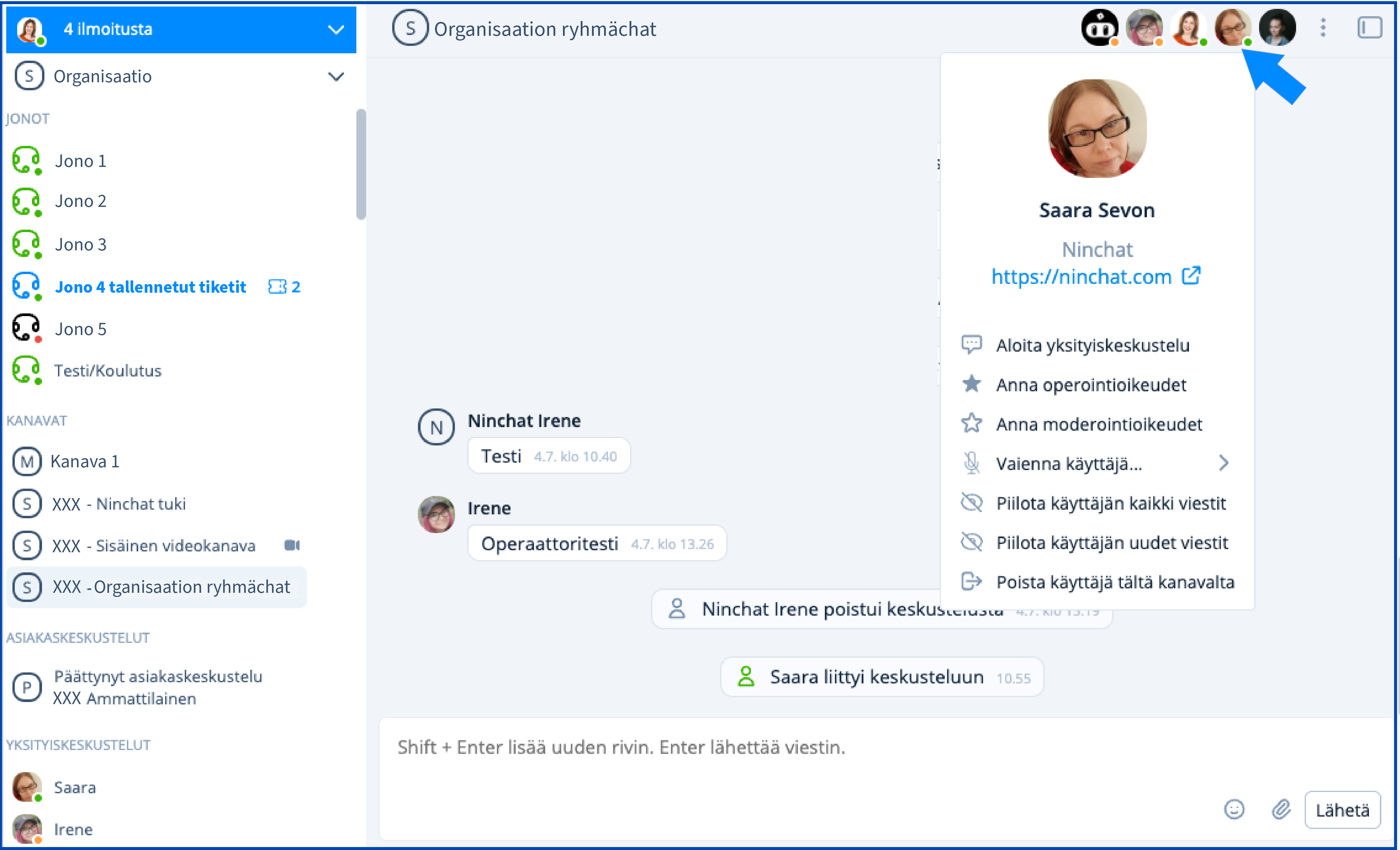
 . A channel operator can grant channel-specific moderator rights to other members.
{% hint style="info" %}
After moderator rights have been granted, refresh the page for the change to take effect.
{% endhint %}
{% hint style="info" %}
### Do not keep moderator rights enabled unnecessarily
Do not keep moderator rights enabled unnecessarily, especially on private team channels. This helps prevent moderators from accidentally hiding messages or removing users from a channel.
{% endhint %}
### Moderation tools

### Hidden messages
With the moderation tools, you can hide disruptive or unnecessary messages. See the instructions below. You can make hidden messages visible in your user settings.
{% content-ref url="/pages/GlOGVPNZxaZE5QD1k58V" %}
[Organizing a group discussion](/ninchat-support/english-new/public-group-discussions/organizing-group-discussion.md)
{% endcontent-ref %}
### Channel settings
#### Who can write in the channel
In channel settings, you can define how visitors can write in the channel. For example, you can reduce disruptive behaviour by automatically silencing new visitors or hiding their messages.
See the Channel settings section “Security settings – who can write in the channel” for more information:
{% content-ref url="/pages/-LOxHCjk03sLbGfPQEEM" %}
[Channel settings](/ninchat-support/english-new/user-interface/team-channels/channel-settings.md)
{% endcontent-ref %}
See “Channel menu” below for additional channel settings.
### Conversation tools
Open the moderation tools by hovering over a comment and clicking the three-dot menu.
. A channel operator can grant channel-specific moderator rights to other members.
{% hint style="info" %}
After moderator rights have been granted, refresh the page for the change to take effect.
{% endhint %}
{% hint style="info" %}
### Do not keep moderator rights enabled unnecessarily
Do not keep moderator rights enabled unnecessarily, especially on private team channels. This helps prevent moderators from accidentally hiding messages or removing users from a channel.
{% endhint %}
### Moderation tools

### Hidden messages
With the moderation tools, you can hide disruptive or unnecessary messages. See the instructions below. You can make hidden messages visible in your user settings.
{% content-ref url="/pages/GlOGVPNZxaZE5QD1k58V" %}
[Organizing a group discussion](/ninchat-support/english-new/public-group-discussions/organizing-group-discussion.md)
{% endcontent-ref %}
### Channel settings
#### Who can write in the channel
In channel settings, you can define how visitors can write in the channel. For example, you can reduce disruptive behaviour by automatically silencing new visitors or hiding their messages.
See the Channel settings section “Security settings – who can write in the channel” for more information:
{% content-ref url="/pages/-LOxHCjk03sLbGfPQEEM" %}
[Channel settings](/ninchat-support/english-new/user-interface/team-channels/channel-settings.md)
{% endcontent-ref %}
See “Channel menu” below for additional channel settings.
### Conversation tools
Open the moderation tools by hovering over a comment and clicking the three-dot menu.
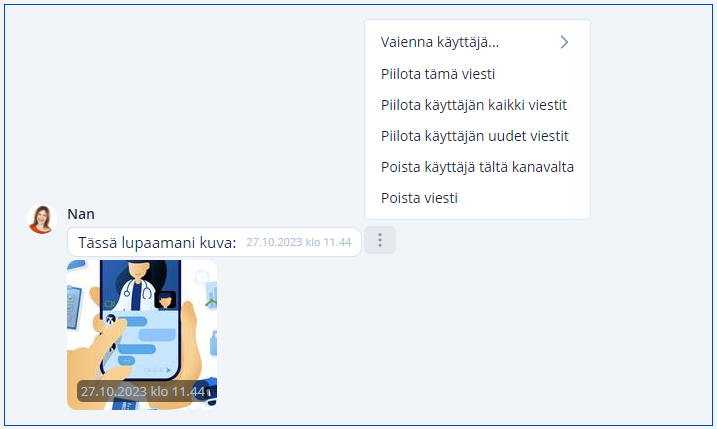 | Conversation tool | Function |
| ----------------------------------------- | --------------------------------------------------------------------------------------------------------------- |
| **Silence user...** | Silence the user for 5 minutes, 15 minutes, 1 hour, 24 hours, or indefinitely |
| **Hide this message** | Hide the selected message from other users |
| **Show message** | Show a hidden message |
| **Hide all messages from this user** | Hide all messages from the user from other users |
| **Show/Hide new messages from this user** | Hide or show the user's new messages by default; moderators can still show or hide individual messages manually |
| **Remove user from this channel** | The user can no longer write in the channel or see new messages |
| **Delete message** | Permanently remove the message from the channel |
### User menu
Click a user in the member list to open the user menu.
| Conversation tool | Function |
| ----------------------------------------- | --------------------------------------------------------------------------------------------------------------- |
| **Silence user...** | Silence the user for 5 minutes, 15 minutes, 1 hour, 24 hours, or indefinitely |
| **Hide this message** | Hide the selected message from other users |
| **Show message** | Show a hidden message |
| **Hide all messages from this user** | Hide all messages from the user from other users |
| **Show/Hide new messages from this user** | Hide or show the user's new messages by default; moderators can still show or hide individual messages manually |
| **Remove user from this channel** | The user can no longer write in the channel or see new messages |
| **Delete message** | Permanently remove the message from the channel |
### User menu
Click a user in the member list to open the user menu.
Hide or show the user's new messages by default
(moderators can still show or hide individual messages)
| | **Remove user from this channel** | Remove the user completely from the conversation. | ### Channel menu Click the channel name in the header to open the channel menu. | Option | Function | | ---------------------------- | -------------------------------------------------------------------------------------------- | | **Silence all** | No users can write new messages. | | **Unsilence all** | Allow all users to write messages. | | **Enable autohide for all** | Hide all messages from new users automatically. Moderators can reveal messages individually. | | **Disable autohide for all** | Show messages from new users automatically. | | **Close channel** | Close the channel and the conversation. |